

AI for Workflow Automation: Tools, Benefits & Real-World Use Cases
Manual approvals, ticket routing, expense checks, and data entry quietly drain hours from every team. AI changes that. By layering decision logic on top of repetitive workflows, businesses are cutting turnaround times, reducing errors, and freeing teams to focus on work that actually moves the needle.
The momentum is unmistakable. McKinsey reports that 92% of companies plan to increase AI investment in the next three years, yet only 1% have reached full maturity. The gap between intent and execution is where most teams get stuck, and where bringing in an AI consultancy partner often makes the difference between a stalled pilot and production-grade automation.
This guide breaks down how AI workflow automation actually works, where it delivers measurable results, the tools worth evaluating, and how to roll it out without disrupting what's already working.
Key Takeaways
- AI workflow automation swaps rigid rules for adaptive logic that learns from data and scales without extra headcount.
- AI doesn't replace BPM — it adds the inference layer that fixed rules can't provide.
- Six components make it work: preprocessing, decision engine, orchestration, human oversight, integrations, and monitoring.
- The fastest ROI shows up in marketing, HR, customer support, finance, and inventory forecasting.
- Tool choice should match maturity: Zapier and Make for speed, Power Automate for Microsoft stacks, UiPath for enterprise scale.
- Skip the pilot, and most rollouts fail. Audit, target, tool, test, then expand.
- The four big risks — privacy, bias, adoption, legacy systems are predictable and solvable upfront.
- Build custom only when off-the-shelf can't handle your edge cases, data, or compliance needs.
- Hyperautomation, AI plus RPA, no-code tools, and natural-language orchestration are now mainstream, not experimental.
What Is AI for Workflow Automation?
AI for workflow automation refers to using artificial intelligence to handle structured, repeatable business processes with decision logic that improves as more data flows through the system.
If your operations involve steps like assigning tickets, approving expenses, or validating form inputs, you're following a fixed workflow. AI replaces these static rules with adaptive logic.
For example, instead of routing every ticket based on keywords, the system can prioritize based on customer history, sentiment, and urgency without human triage.
In HR, it ranks candidates by profile relevance before any recruiter reviews a resume. In IT, it flags incidents that are likely to escalate, based on previous patterns.
If this matches how your team works today, you're already a fit for AI workflow automation. With the right data and integration points, automation using AI becomes less about replacing tasks and more about letting your systems respond intelligently to change.
According to Accenture, automating business processes with AI could improve workforce productivity by as much as 40% by 2035. That represents a significant gain in efficiency, which means the team can handle more volume, reduce turnaround times, and focus on higher-value initiatives.
Traditional vs. AI Workflow Automation – Which One Should You Go For?
Traditional automation follows rule-based logic. Every step is predefined. For instance, if X happens, do Y. It works well for repetitive processes with little variation, such as sending invoice reminders or routing form submissions. But when data changes or context varies, static logic falls short.
Instead of fixed rules, AI workflow automation uses models trained on historical data to make decisions. The system adapts to exceptions, learns from outcomes, and handles complexity without manual reconfiguration.
When it comes to decision-making, AI systems can factor in multiple variables and continuously adjust based on new input. Scalability is also an advantage.
As workload increases, AI continues to operate without needing more human input. That makes it valuable for teams managing high volumes with tight resources.
Here's a quick comparison:
| Traditional Automation | AI Workflow Automation |
| Follow fixed rules | Learns from data |
| Needs manual updates | Adjusts based on outcomes |
| Handles simple, repeatable tasks | Manages complex and changing processes |
| Breaks down when data varies | Adapts to new inputs |
| Works best when steps don’t change | Works well with unpredictable conditions |
| Slower to scale | Scales without extra resources |
| Limited to one system at a time | Connects across multiple tools |
AI for Workflow Automation vs BPM
BPM provides structure, but you can't expect structure alone to adapt. Sure, using BPM tools helps you map out steps, set approvals, and keep things in order.
But how will a fixed framework make decisions? So what happens when your processes need structure but also agility?
Relying on fixed rules gives you order, but not insight. That's the limitation of conventional BPM: it executes, but it doesn't interpret.
Now think about the moments where your process doesn't follow the usual path.
A request lands late. A form is missing key details. A customer replies with urgency that no rule could predict. In those cases, logic alone isn't enough because you need inference. That's where automation, informed by data, steps in.
AI automation extends the capabilities of traditional BPM by adding real-time decision-making and adaptability. While BPM systems provide structure and process clarity, AI enhances them with data-driven inference, automatically detecting delays, identifying exceptions, and advancing tasks without manual intervention.
Instead of replacing BPM, AI complements it. The result is a more responsive, efficient system that adapts to change while maintaining operational control.
If your team's managing scale, complexity, or shifting input from multiple channels, consider this: predictability isn't always your advantage. Responsiveness is. Teams that bring AI into the business alongside their existing BPM stack tend to land on both at once.
Key Components of AI Workflow Automation
BPM gives you structure. AI gives you an interpretation. But behind that adaptability is a system built on interconnected parts that quietly keep everything working.
If AI is going to complement your processes instead of disrupt them, you need to understand what makes it run and what could cause it to stall.
Understanding the tech stack behind AI workflow automation doesn't require memorizing technical layers. It's about knowing what each part contributes and what happens when it breaks.
Take a look at these key components.
-
Data Input & Preprocessing
Raw input means nothing unless it's ready.
Forms come in incomplete. Tickets arrive in five languages. PDFs are scanned sideways.
And still, you expect decisions.
Preprocessing provides control. This first step gives AI something it can actually work with: clean, contextual data.
AI utilizes tools such as OCR to extract text from scanned files, language models to detect and standardize inputs, and simple pipelines (built with Python or cloud functions) to structure the data. Without this, even the best models stall before they start.
-
AI Decision Engine
Logic is no longer rule-based; it's learned.
A decision engine isn't a sequence of "if this, then that." It's a model that interprets. That knows what matters and what doesn't.
Instead of making guesses, AI references patterns, learns from outcomes, and narrows uncertainty with each pass. This is where your AI workflow automation starts to think and benefit your company.
AI decision-making is often powered by supervised learning models trained on historical data. Whether it's a classification task (approve or escalate) or a scoring problem (likelihood of churn), these models are deployed through APIs using tools like TensorFlow, Scikit-learn, or cloud ML platforms. Teams that need workflow logic no vendor offers will sometimes build a machine learning model from scratch rather than fine-tune an existing one.
-
Orchestration Layer
You've got tools running in parallel — CRM, ticketing, and billing.
Orchestration decides who moves next, not with hard-coded triggers, but with logic that respects dependencies, outcomes, and real-world delays. AI-enhanced orchestration goes beyond static flows.
Using event-driven frameworks like Apache Airflow or AWS Step Functions, tasks are sequenced based on model output, confidence scores, or SLA timers, adapting execution in real-time based on context, not just rules.
-
Human-In-The-Loop (HITL) Mechanism
Even when AI performs well, you'll want discretion. A HITL mechanism gives people the final say when stakes are high or confidence drops. It's always about shared accountability.
HITL setups typically include confidence thresholds and override triggers. If a model’s prediction drops below, say, 80%, the task is routed to a human for review. This is implemented through dashboards, feedback queues, or tools like Label Studio or custom QA portals.
Knowing when to include HITL is as important as knowing how to build it. It belongs in your workflow when three conditions are met: the model's confidence is variable rather than consistently high, the downstream consequences of a wrong decision are significant, or regulatory requirements mandate human sign-off. It does not belong in every step. Overusing HITL defeats the purpose of automation and creates approval bottlenecks that are harder to manage than the manual process you replaced. The goal is surgical placement, human judgment exactly where it adds value, and nowhere else.
-
Integration With Internal Systems
Great logic fails without access. AI process automation only delivers when your stack talks. Connecting AI to internal systems is what makes that possible, whether it's pulling timestamps from Jira or writing back to NetSuite, so data can travel freely without friction.
Integrations rely on REST APIs, webhooks, or event buses, such as Kafka, to enable AI systems to read and write data across platforms. These connections allow automated workflows to act on live context, rather than static snapshots, making them far more reliable in production.
-
Monitoring & Analytics
If you can't see it, you can't fix it. Monitoring is a feedback loop.
You track not to observe, but to adjust. Error spikes, skipped steps, odd patterns; this is precisely where small corrections prevent large breakdowns. AI systems need observability across both model performance (like accuracy, drift) and workflow health (timeouts, retries).
Tools like Grafana, Datadog, or ML-specific solutions like Arize AI help teams audit behavior and retrain or reconfigure when needed.
AI for Workflow Automation - Use Cases
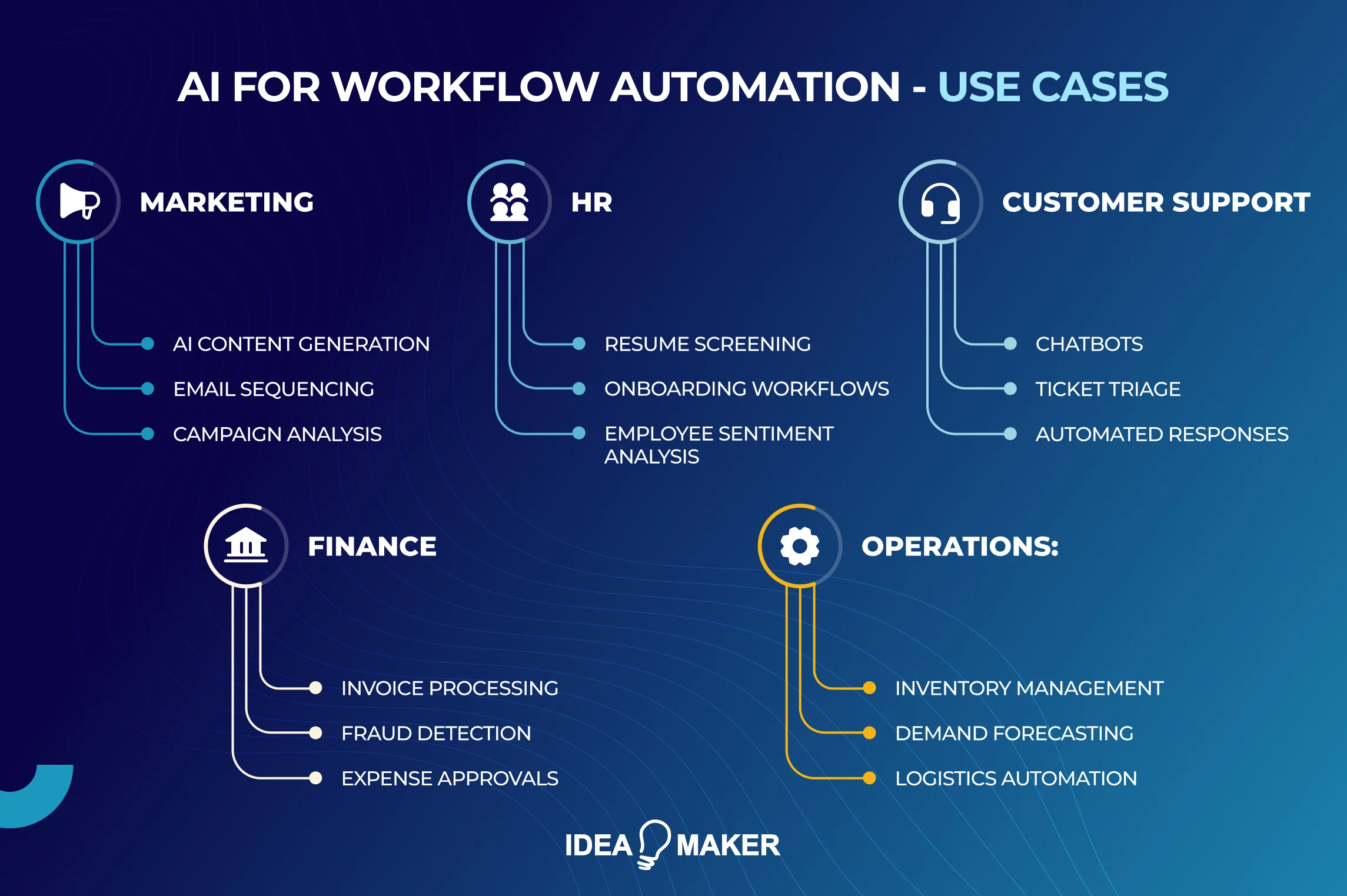
These components aren't theoretical. They show up as real-world examples of AI integration already powering outcomes in live environments across marketing, finance, HR, and more. Once the architecture is in place, the real value appears in action. That's where AI automation proves itself, not in setup, but in use.
Repetition burns time. From marketing reports to payroll checks, your team is probably stuck chasing tasks that don't need their full attention. AI for workflow automation is a practical tool enabling your employees to focus on work that moves your business forward.
Marketing: Campaign Optimization
Manual reporting, A/B tests, budget reallocation, and managing campaigns mean keeping up with change. But what if the campaign could keep up with itself?
That's what The North Face tapped into. Their system analyzes shopper behavior as it happens, shifting copy, creative, and ad spend mid-flight. No more guessing which version works. The data decides. The team adjusts. Nothing stalls.
HR: The End of Resume Pileups
Reviewing 600 CVs for a single job opening? That would exhaust the HR and prove inefficient, too.
AI uses NLP models to parse resumes, sentiment analysis to assess video interviews, and ranking algorithms to score candidates against role-specific benchmarks. Many systems integrate with ATS platforms and deliver structured shortlists automatically.
At Unilever, recruiters let AI do the first pass. The system watches video interviews, parses tone and content, and highlights top fits.
Not only does it handle over 1.8 million job applications a year, but it also gives each candidate custom feedback. It's saved 70,000 hours of recruiter time while improving candidate feedback.
Customer Support: Chatbots and Ticket Triage
When ticket queues pile up and agents juggle repetitive questions, customers wait, and satisfaction drops. Support teams are under pressure to respond faster.
AI automation tackles this with natural language understanding (NLU) and intent recognition to handle FAQs in real time. More advanced platforms use sentiment analysis, ticket classification, and workflow routing to triage requests based on urgency or topic. Tools like Dialogflow, Rasa, and Zendesk AI allow seamless escalation to live agents when needed.
For instance, Vodafone’s chatbot, TOBi, now handles up to 30 million conversations a month. It resolves about 70% of them without agent involvement, helping the company reduce response times and free up staff for high-impact interactions.
The scalability impact is where AI automation earns its place in support operations. Without automation, support capacity scales linearly: more tickets means more agents. AI breaks that relationship. Deflection handles a portion of incoming volume before it ever reaches the queue. Automated triage gets the remaining tickets to the right agent faster. AI-suggested responses reduce the time each agent spends per ticket. The combined effect is that support teams absorb significantly more volume without proportional headcount growth.
The realistic ceiling for most businesses is around 60 to 70 percent automation across total interaction volume, with complex, high-value, or emotionally sensitive cases remaining with human agents. The teams that implement this well do not shrink their support function. They redirect it toward the interactions that actually benefit from a human on the other end.
Finance: Invoice Processing and Payroll
Finance teams know the routine: download the invoice, check the figures, re-enter into a spreadsheet, flag an anomaly, chase approvals.
Then repeat.
Mistakes creep in, and no one enjoys reconciling numbers under pressure.
AI handles this by using OCR to extract invoice data, classification models to tag vendors and expense types, and rule-based logic for tax, policy, and threshold validation.
Time-tracking and payroll systems are synced using APIs, allowing end-to-end automation across spreadsheets, ERPs, and approval flows.
Communicorp UK used to take two full days to run payroll. After automating wage calculations and integrating time logs, it’s down to one hour, with fewer errors, fewer emails, and no last-minute fixes.
And this isn't isolated. According to the Bank of England, 75% of financial firms in the UK now use AI to cut down on high-volume, low-judgment work such as approvals, checks, and reconciliations.
Operations: Inventory and Forecasting
One delay in inventory can ripple into stockouts, customer complaints, or warehousing costs.
AI models use time-series forecasting, demand sensing, and weather or regional trend data to predict inventory needs. These systems connect to ERPs and fulfillment platforms to adjust procurement and logistics in real time.
Walmart, for example, uses AI to manage real-time inventory data across thousands of stores. Their system tracks weather patterns, regional buying trends, and past sales to automatically adjust stock levels and delivery schedules, helping the company reduce waste and avoid empty shelves.
Types of Workflow Automation With AI
With AI in practice across HR, finance, and operations, you might've already jumped on the automation bandwagon and now you're questioning whether the way you've been doing it is scalable, maintainable, or just stitched together under pressure.
Is it built to scale? Choosing the right AI model makes a difference. Here are a few that can automate your business operations just right.
Intelligent Process Automation (IPA)
IPA is automation enhanced with AI technologies like machine learning and NLP. Unlike rule-based systems, it handles unpredictable or semi-structured workflows by learning from data and adjusting responses over time.
Some workflows never behave the same way twice. If your process breaks every time input formats change, IPA is your fix.
Intelligent Process Automation combines automation with intelligence, learning how to respond to conditions without constant rule rewrites. Common examples include claims intake, contract approvals, and partner onboarding.
RPA with AI
RPA uses software bots to mimic human actions in rule-based tasks like clicking, copying, and pasting. When combined with AI, it can interpret data, adjust to changes, and handle edge cases without manual updates.
Basic RPA is fast and cost-efficient, but it breaks the moment something unexpected appears.
Pair it with AI, and it adapts. When a form field moves or a document structure changes, AI prevents failures. This makes AI workflow automation more stable for long-term use.
AI Agents
AI agents are autonomous systems that observe, decide, and act across digital environments. Unlike bots, they operate continuously, carry out multi-step tasks, and coordinate tools without being explicitly told what to do.
Processes rarely live in one tool. AI agents move across systems, pulling reports, submitting forms, or flagging issues, without a human asking them to.
If your operations rely on Slack, Google Sheets, or Jira in parallel, agents work behind the scenes to keep everything current.
Conversational AI Workflows
Not everyone wants to click through forms or wait on tickets. Conversational AI lets people ask questions or complete tasks in natural language.
Whether someone needs an expense policy or access to a document, the AI can answer, act, and log the interaction without manual handoff.
Document Understanding Automation
Manual data extraction from documents is still one of the biggest time drains. AI reads files, extracts the right values, and kicks off the next step. In industries like insurance, legal, or finance, it's the only way to keep up. This is where AI workflow management proves its true value.
Benefits and Capabilities of AI Workflow Automation
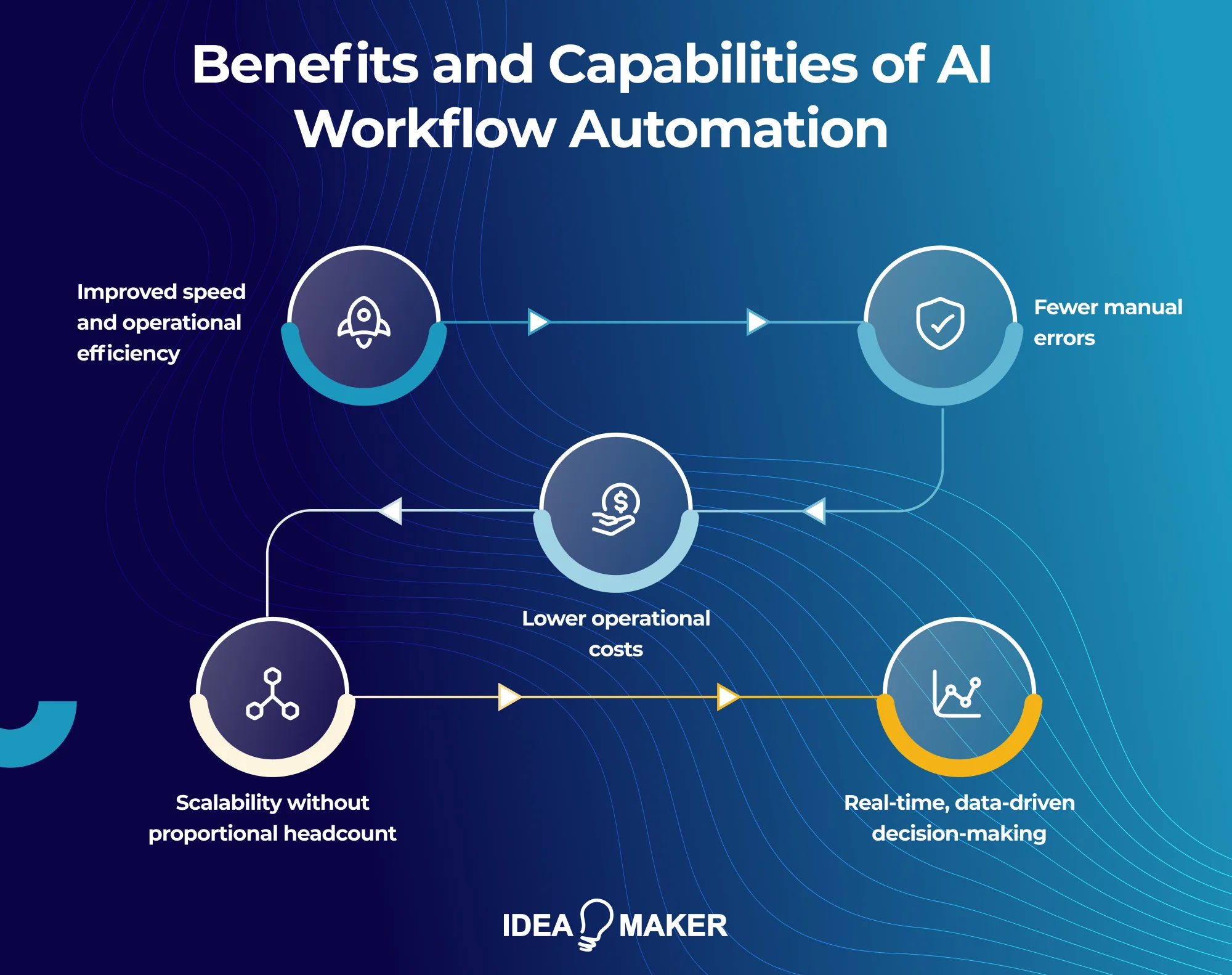
After implementing AI workflow tools across multiple departments, we've seen firsthand how they can reshape operations.
Here's what works and why it matters for businesses.
Benefits
So what does the real scope of AI workflow automation look like beyond quick wins and isolated improvements? It reaches deeper than most teams anticipate.
Here's where the impact shows up first:
- Processes that once dragged across days now run in minutes, with no need for constant check-ins or follow-ups between teams.
- When AI takes over repetitive inputs, the error rate drops, and the ripple effect of poor data organization disappears with it.
- What used to require multiple platforms and hours of admin now happens in one place, reducing both software costs and time lost to multitasking.
- As activity scales, headcount doesn't have to. AI systems flex to handle volume without compromising output quality or requiring more people to manage it.
- Instead of waiting on reports, managers get immediate insight into what's happening and what needs their attention right now.
Core Capabilities
Take a look at AI automation’s core capabilities.
- Due to intelligent data processing, AI identifies patterns and extracts actionable insights automatically.
- Repetitive task automation like ticket triage or HR routine now runs without oversight, reducing dependency on manual checks.
- Forecasting used to mean looking at last quarter's data and making guesses. With AI predictive analysis, trend detection happens early, and churn signals, inventory gaps, or cost spikes get flagged before they turn into problems.
- If your teams still rely on tickets for simple requests, NLP is your shortcut. Instead of filling forms, employees type a question that the system understands, acts on, and moves on.
- You don't need to dig into dashboards to catch issues. AI's real-time monitoring keeps a check on operations continuously and pings the right person the moment something looks off.
- Some bottlenecks repeat because no one has time to fix them. AI's continuous workflow optimization notices what slows things down, then quietly adjusts the process so it runs better the next time without being told.
Best AI Tools for Workflow Automation
To reap the benefits and capabilities of AI workflow automation, you need the right tools.
The best AI workflow tools save time and determine how resilient, flexible, and collaborative your internal processes can be. Each tool below fits a specific maturity level and technical setup.
Whether you're building flows between SaaS tools or scaling decision nodes across systems, these are the best AI workflow automation tools.
-
Zapier + OpenAI
If your team operates across multiple SaaS tools and wants to bring light automation into daily tasks, Zapier with OpenAI is a fast entry point.
You can draft emails, summarize form inputs, or trigger approvals without needing engineering hours. It's best for teams looking to automate without overhauling existing platforms.
-
Make (Formerly Integromat)
Make is suited to users who've outgrown basic "if-this-then-that" automation.
It offers layered logic, multiple paths, and deeper customization, ideal for automating repetitive sequences in inventory syncs, reporting pipelines, or customer updates. It sits between low-code and pro-dev territory, perfect for tech-savvy operations teams.
-
Microsoft Power Automate
For orgs heavily invested in the Microsoft ecosystem, this is a natural fit. It's tightly linked with Teams, Outlook, SharePoint, and Excel.
The AI Builder module adds another layer, useful for document classification, invoice handling, or flagging outliers in financial approvals.
-
N8n
If you prefer hosting automation on your own infrastructure, n8n offers full visibility and control.
Developers can write logic, access variables, and integrate with APIs as needed. It is more of an internal automation framework, not just a plug-and-play solution.
-
UiPath & Automation Anywhere
UiPath and Automation Anywhere are AI workflow automation platforms built for enterprise complexity.
Both combine RPA with AI to handle logic that changes mid-process, useful for audit-heavy tasks, insurance workflows, or healthcare operations. They're best deployed when compliance and scale are non-negotiables.
-
Relevance AI
Relevance AI is designed for unstructured data such as call transcripts, reviews, or support chats.
It helps teams label, group, and route this kind of information for faster decisions and better prioritization. If classification or summarization is a bottleneck, Relevance AI is a strong fit.
-
LLMs like ChatGPT, Claude, and Gemini
Used correctly, these tools are decision engines embedded inside flows. Teams apply them to score inputs, rewrite outputs, or enrich data mid-stream. They're most effective when paired with a framework like Make or n8n to guide where and how they operate.
How To Automate Your Workflow With AI
If your business operations still rely on manual inputs, delayed handoffs, or error-prone spreadsheets, it's time to fix the foundation.
AI workflows give you a way to do more, faster, without burning out your team or scaling headcount too early.
Here's how to start automating the right way, step by step.
Step 1: Audit Your Current Processes
Start by mapping what's already in motion. Which tasks happen repeatedly? Where do approvals stall? Teams often skip this, but it's how you surface inefficiencies that workflow process automation can actually solve.
Step 2: Identify Automation Candidates
Don't blindly automate every single task. Focus on what slows your team down but doesn't require expert judgment.
If a task involves interpreting data, sending updates, or routing based on conditions, it's a candidate for intelligent workflow automation.
Think: repetitive ticket triage or form reviews.
Step 3: Choose the Right Tools
One size never fits all. Low-code tools suit lean teams; advanced platforms suit ops-heavy orgs.
Choose tools that handle your volume, work with your stack, and support AI workflows instead of breaking when the unexpected happens.
Step 4: Create Small Proof-of-Concept Workflows
Don't roll out automation across the board. Pilot one meaningful process, something like CRM updates or invoice checks. It's here that a generative AI workflow can show real gains by simplifying logic and surfacing trends.
Step 5: Monitor and Refine
Your first implementation won't be your final one. Track outputs, error rates, and user behavior. The most valuable AI workflow automation examples come from systems that evolve with your business, not static setups.
At Idea Maker, developing AI for the business starts with the logic the operations already run on. We don't push a template. Instead, we assess how your operations function today and build automation that connects the dots across tools, data, and teams.
Challenges of AI Workflow Automation
Even the smartest tools can create more problems than they solve when not implemented properly. Developing AI brings its own challenges, and below are four common pitfalls and how to plan around them, based on what actually works when deploying AI for workflow automation at scale.
Below are four common pitfalls and how to plan around them, based on what actually works when deploying AI for workflow automation at scale.
-
Data Privacy & Compliance
Make sure every system handling customer or business data aligns with regulatory requirements. Build in access controls, audit trails, and encryption from day one.
Compliance should be a part of your architecture.
-
AI Model Limitations and Biases
No model is objective without training and monitoring.
Use diverse datasets and test outputs across real-world edge cases.
For high-stakes use (like hiring or approvals), include validation checks or fallback logic so your process doesn't rely on a single decision layer.
-
Change Management and Employee Adoption
Automation fails without buy-in. Teams need context, not just instructions. Communicate what's changing, what stays manual, and how roles will evolve.
Start with non-critical workflows to build confidence before rolling out broader AI for workflow automation projects.
-
Integration With Legacy Systems
Legacy systems weren't built to talk to AI tools.
Use APIs, middleware, or lightweight connectors where possible if real-time integration isn't an option; design around asynchronous updates.
Not sure how to resolve these challenges in your environment?
Even the most experienced teams struggle to align automation with security, legacy tools, and shifting roles.
At Idea Maker, we help clients overcome these hurdles by designing automation around secure architecture, retrainable models, and human-in-the-loop oversight, all while aligning with their compliance environment.
What Type of Businesses Can Benefit the Most From AI Workflow Automation?
Not sure if this applies to your team?
Ask yourself this: Do your daily operations rely on repeated tasks, long email chains, or siloed tools?
If so, AI can make an immediate impact, no matter your size or sector.
- Small Teams or SMBs: Manual steps stack up fast when your team is lean. If you're spending hours on follow-ups, copy-pasting between systems, or waiting on approvals, AI workflow automation helps you reclaim that time. For example, scheduling, lead assignments, or ticket routing can run in the background, without adding headcount.
- Mid-Size Organizations: If your ops involve multiple departments, delays often come from handoffs, not people. AI can manage these transitions, syncing systems, pushing updates, and flagging blockers. It brings consistency where cross-functional work tends to break down.
- Enterprises with Legacy Systems: AI doesn't mean replacing everything. If you're running legacy platforms but need smarter routing, forecasting, or compliance checks, consider intelligent workflow automation layers in the logic. You keep your systems, but get better outcomes.
One question that comes up across all sizes is whether the investment pays off. For small teams, the answer usually shows up within weeks. Eliminating two to three hours of daily manual work per person, across even a five-person team, compounds quickly. For mid-size organizations, the return is less about individual time savings and more about removing the coordination overhead that grows as headcount increases. For enterprises, the case is typically built around compliance, audit requirements, and the cost of errors at scale rather than hours saved. Across all sizes, the baseline test is the same: if your team is spending meaningful time on repeatable, rule-based tasks, automation will return more than it costs. The variable is which tools match your current scale and technical capacity, not whether the investment makes sense.
Industries Seeing the Fastest ROI
- Finance: Invoice processing, fraud alerts, expense tracking
- Logistics: Order flow tracking, demand prediction, exception alerts
- E-commerce: Return handling, product tagging, campaign updates
- Healthcare: Patient intake, compliance monitoring, claims routing
- Professional Services: Scope tracking, approvals, client updates
If the work repeats and the rules can be taught, AI can likely automate it reliably, without rewriting how your business runs. Companies in these sectors often shortlist leading AI development companies before scoping their first automation pilot.
At Idea Maker, we’ve worked with enterprise clients using legacy CRMs and ERPs, building intelligent automation layers that allow teams to forecast, route, and validate without replacing existing systems.
What's the Best Way To Use AI To Automate Tasks and Business Processes?
Consider this: your finance team still closes invoices manually, your ops rely on Slack updates for progress checks, and every routine task runs through three systems. Now ask yourself, are you scaling, or just coping?
If you're just getting started or moving fast, begin with no-code orchestrators. Tools like Zapier or Make let you build workflows between apps using logic that's easy to test and refine. Think status updates from spreadsheets, chatbot escalations, or auto-tagging leads, all without writing code. These tools are built for speed, and for most small teams, they're all you'll ever need.
For structured ops or high volume, the calculus changes. Enterprise-grade platforms like UiPath or Power Automate bring control that no-code tools can't match. They handle audits, approvals, compliance logging, and deep integrations with legacy systems. They don't just run; they report, govern, and integrate at a level that Zapier was never designed for.
Choosing between them comes down to three questions. How complex is the workflow? If it involves legacy systems, conditional logic across five or more steps, or strict audit requirements, no-code tools will hit a ceiling quickly. How much volume are you running? Per-task pricing on no-code platforms becomes expensive at scale, whereas enterprise platforms carry higher upfront costs but predictable long-term economics. And how much does a failure cost? No-code tools are easier to build and easier to break. Enterprise platforms are harder to implement but far more resilient in production.
The practical approach is to start with a no-code tool on a contained workflow, measure the result, and only move to an enterprise platform when you hit a ceiling in volume, reliability, or integration depth. Migrating later is manageable. Over-engineering from day one is not.
And if your processes don't follow typical patterns? Custom-trained models allow you to replicate how your team actually makes decisions, but at scale and without the manual overhead. You don't need to replace people. You need to stop relying on them to manually supervise every task across every tool.
Build Custom AI Automation for Your Internal Processes
If your team is working around outdated tools, disconnected systems, or approval chains that don't scale, it's likely costing more than just time.
Off-the-shelf platforms weren't designed with your edge cases in mind. That's why teams eventually weigh building custom AI vs picking off-the-shelf tools, and custom automation is often the practical next step.
At Idea Maker, we develop AI systems that align with the logic your business already runs on. We don't push a template. Instead, we assess how your operations function today and build automation that connects the dots across tools, data, and teams.
You'll get internal tools that simplify request handling, approvals that adapt to conditions, and AI agents that support recurring tasks. It's not about doing everything with AI, it's about doing the right parts better, using the systems you already have.
We work with you from planning to deployment, and adapt with you over time. Whether it's CRM routing, finance data cleanup, or task prioritization, your automation will fit the way your business actually operates, not how a platform thinks it should.
Trends To Look Out for in AI Workflow Automation in 2025
Over 80% of businesses have partially embraced AI, and 35% are now using it across departments, treating AI not just as a tool but as core infrastructure. That shift mirrors where AI is taking modern business more broadly, which is exactly why 2025's trends aren't about what's new, but what's getting adopted at scale.
Hyperautomation
- Hyperautomation has become a business priority. Companies are now combining AI, RPA, and process mining to automate everything from compliance checks to internal ticket resolution. Autonomous agents are another shift. AI systems handle follow-ups, summarizations, and task ownership without supervision.
AI + RPA convergence
- We're also seeing a strong push toward AI + RPA convergence, where rule-based automation now benefits from intelligent decision-making.
No-code/low-code AI tools
- Meanwhile, no-code AI tools are removing blockers for operations and product teams who previously relied on developers.
AI workflow orchestration using natural language prompts
- And natural language orchestration is gaining speed, letting teams build and trigger AI-driven flows with simple prompts, no training required.
Final Thoughts
If you're still treating AI like a side tool, you're missing the bigger opportunity. It's not about replacing teams or overhauling everything at once.
AI automation for workflow consists of building systems that actually move with your business.
The real wins come when you apply AI where it counts: delays that stall decisions, repetitive steps that eat into your week, and tasks that follow the same logic every time.
Start by running a small test, learn from it, then expand what works. That's how the best teams are building long-term gains.
Treat AI not as a feature, but as a performance layer. One that keeps your processes sharp, adaptable, and ready for whatever comes next. If you're ready to explore what this could look like for your business, get in touch with Idea Maker.
FAQ
Can AI automate decision-making in workflows or does it still need humans?
AI can automate a significant portion of workflow decisions, but how much depends on the stakes and confidence level of each decision point. For low-stakes, high-volume decisions like routing a support ticket, approving a standard expense, or tagging an incoming lead, AI handles these reliably without human input. For higher-stakes decisions like flagging a compliance breach, approving a loan, or making a hiring call, AI should inform the decision rather than make it autonomously.
Most mature implementations use a confidence threshold approach. If the model's confidence score clears a defined level, the decision executes automatically. If it falls below, the task routes to a human for review. This is what makes workflow design matter as much as model quality.
Full automation is rarely the right target. The goal is removing human involvement from decisions that don't need it, while keeping human judgment precisely where it creates value the model cannot reliably replicate.
How do you automate workflows that span multiple tools, systems, and APIs?
Cross-system automation requires an orchestration layer that sits above your individual tools and coordinates actions between them. In practice, this means connecting your CRM, ticketing platform, ERP, and communication tools through APIs, webhooks, or integration middleware like Zapier, Make, or n8n. The orchestration layer determines what happens next based on the output of each step, whether that is a model confidence score, an approval status, or a data field value.
The biggest challenge in multi-system automation is data consistency. Each tool stores and formats data differently, and those mismatches cause failures at handoff points. Before automating across systems, map exactly what data needs to move between each tool, in what format, and at what trigger.
For legacy systems without native APIs, middleware connectors or asynchronous data syncs are usually the practical workaround. Start with a two-system integration before expanding further. Complexity compounds quickly, and a reliable two-point flow delivers more value than an ambitious five-system workflow that breaks regularly.
What are predictive workflows and how do they differ from standard automation?
Standard automation reacts to what has already happened. A form is submitted, a trigger fires, a task is assigned. Predictive workflows anticipate what is likely to happen next and act before the trigger occurs. They use historical data and machine learning models to forecast outcomes and initiate steps proactively.
For example, a standard workflow routes a support ticket after it is submitted. A predictive workflow identifies customers showing signs of frustration before they submit a ticket and initiates an outreach sequence automatically. In operations, standard automation reorders inventory when stock hits a threshold. A predictive workflow forecasts demand weeks out based on seasonal trends and regional data, adjusting procurement before the threshold is ever reached.
Predictive workflows require more data infrastructure and model maintenance than rule-based automation, which is why they are typically a second or third phase of an automation program rather than a starting point. The businesses that benefit most are those with enough historical data to train reliable forecasting models and enough volume to make early intervention worthwhile.
How reliable and accurate is AI when running business-critical workflows?
Reliability depends on three things: data quality, model training, and how well the workflow is designed around edge cases. For well-defined, high-volume tasks like invoice extraction, ticket classification, or form validation, modern AI models perform with high accuracy when trained on sufficient clean data. Accuracy drops when input data is inconsistent, when the model encounters scenarios it was not trained on, or when the task requires judgment that extends beyond pattern recognition.
For business-critical workflows, reliability is not just about model accuracy. It is about what happens when the model is wrong. Well-designed automation includes confidence thresholds that route uncertain cases to human review, audit logs that capture every decision for traceability, and monitoring systems that flag performance degradation before it causes downstream failures.
AI in production also drifts over time as business conditions change, which means models need periodic retraining to maintain accuracy. Treating AI as a set-and-forget system is the most common reason business-critical workflow automation underperforms. The teams that get consistent results are the ones that build monitoring and retraining into their operating rhythm from day one.