The global mobile app development market is projected to grow from $302 billion in 2025 to over $753 billion by 2033. For business leaders, this represents a massive opportunity, but market size does not guarantee successful execution. The difference between a high-performing product and a budget-draining failure lies in the process.
In this guide, we break down the mobile app development process stage by stage, covering the decisions that matter, the impacts that aren’t obvious, and the mistakes you must avoid to build a scalable product.
What Does the Mobile App Development Process Mean?
The mobile app development process is the end-to-end sequence that turns a concept into a functioning, market-ready app for smartphones or tablets. It starts with planning, research, and validation to define the app's purpose and audience. Next comes UI/UX design, where wireframes and prototypes map out the user experience.
Development follows, with frontend code for what users see and backend code for server-side logic. The app then goes through QA testing to catch bugs and ensure it works across devices. Finally, it launches on the App Store or Google Play and requires ongoing maintenance.
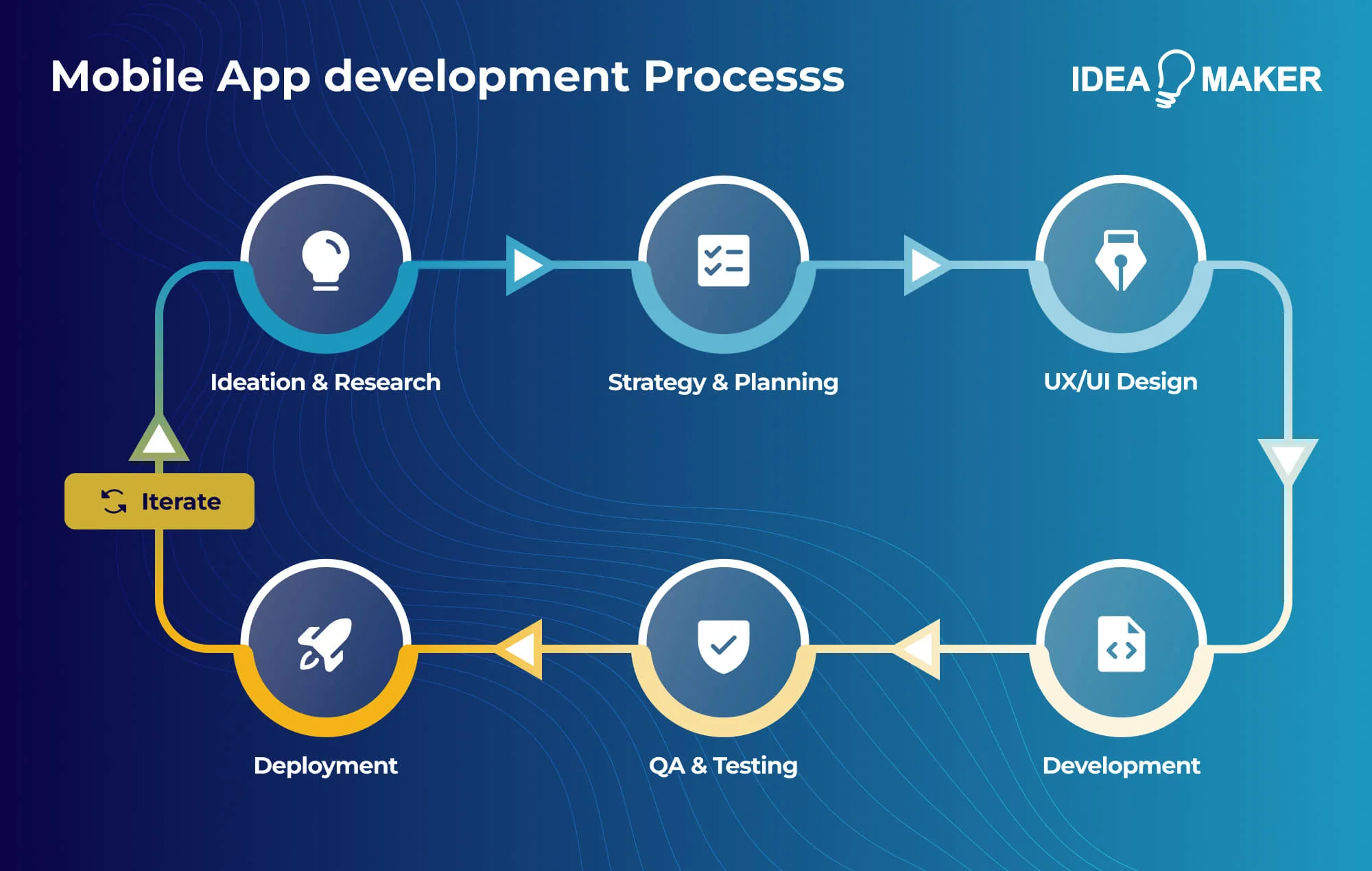
Strategy, design, development, and scaling connect as interdependent pillars.
- Strategy defines what you're building and why.
- Design translates strategy into user experiences.
- Development turns designs into working software.
Scaling ensures the app performs as usage grows. Downstream phases inherit upstream decisions, so a flawed strategy produces a well-designed app nobody wants, and beautiful designs built on brittle architecture can't evolve.
Process maturity directly impacts app success. Experienced teams estimate accurately because they've tracked timelines before. First-time teams consistently underestimate by 2-3x. Mature processes catch problems earlier, and a usability issue found during wireframing costs hours to fix while the same issue found after development costs weeks.
Building an app means writing code that works. Building a product means creating something people want, can find, will pay for, and keep using. Teams that build apps often ship on time and still fail. Teams that build products sometimes ship late but create lasting value.
Common Mobile App Development Approaches
There are a few common approaches to mobile app development, and each affects speed, cost, performance, and flexibility differently.
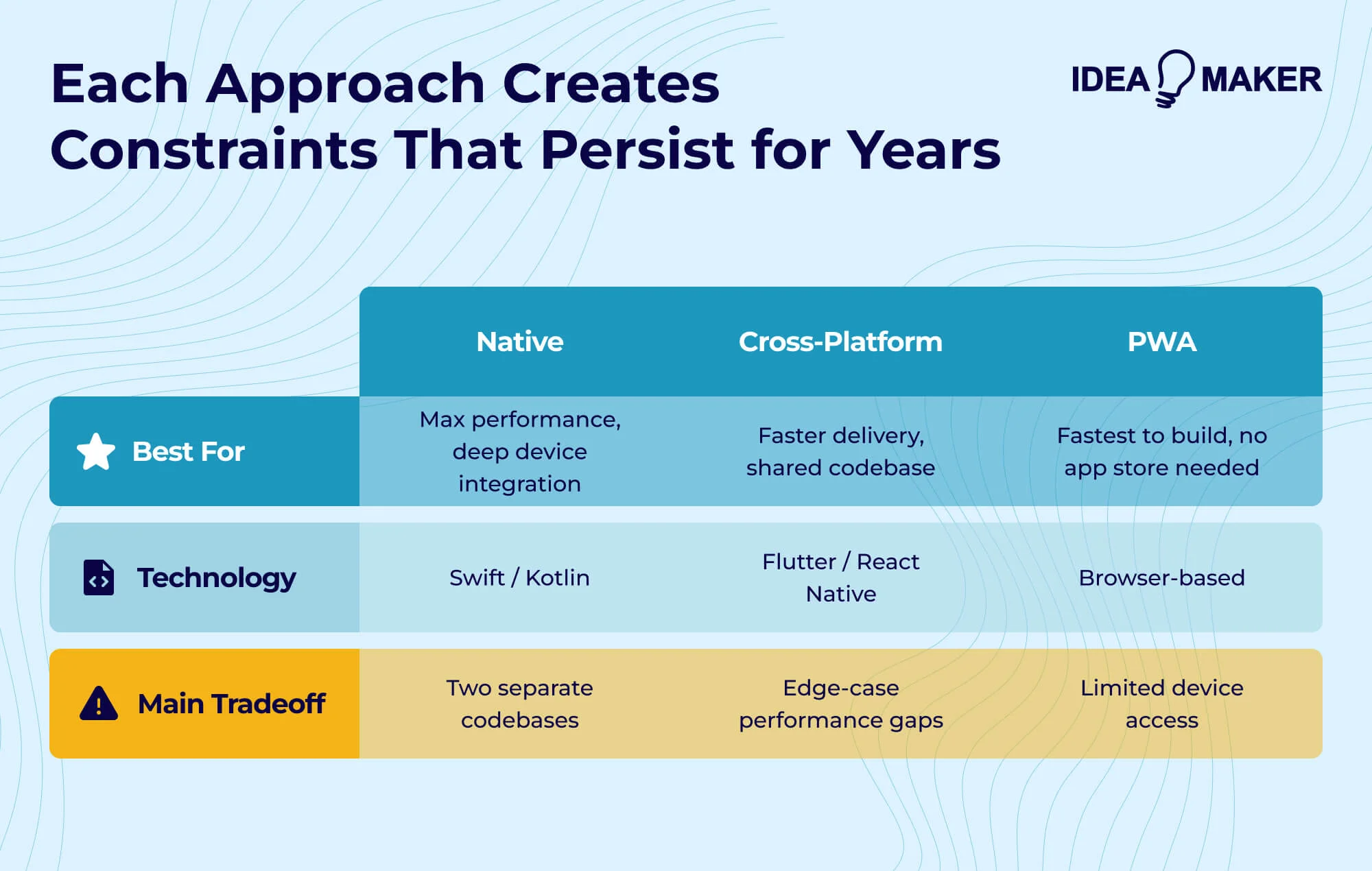
Native app development means building separately for each platform using Swift or Objective-C for iOS and Kotlin or Java for Android. You get the best possible performance, full access to platform APIs, and UI that feels truly native. The limitation is maintaining two codebases, which roughly doubles development and maintenance costs.
Cross-platform development with frameworks like Flutter and React Native lets you write once and deploy to both platforms. Flutter compiles to native code and delivers near-native performance with a rich widget library. React Native uses native components and works well for teams with JavaScript experience. Expect 80-90% code sharing with some platform-specific work required.
Hybrid and progressive web apps (PWAs) wrap web technologies in a native container using frameworks like Ionic or Cordova. Development is fastest if you have web developers, but performance is noticeably worse than native or cross-platform options. PWAs offer no app store approval process and instant updates, though Apple restricts PWA capabilities on iOS.
No-code and low-code platforms like Bubble, Adalo, and FlutterFlow let non-developers build functional apps through visual interfaces. They work for validating ideas, internal tools, and prototypes. However, migrating from no-code to custom development often means rebuilding from scratch.
Choose your approach based on constraints: native for performance-critical apps, cross-platform for standard apps on limited budgets, hybrid or PWA for internal tools, and no-code for quick concept validation.
| Scenario | Recommended Approach |
| Validating a concept quickly | No-code or PWA |
| Standard app, both platforms, limited budget | Cross-platform (Flutter/React Native) |
| Performance-critical or platform-specific features | Native |
| Internal tool for employees | Hybrid or PWA |
| Consumer app competing on experience | Native or Flutter |
| Startup with web dev team, needs mobile fast | React Native |
Stage 1 - Ideation and Market Research
Everything begins with understanding the problem you're solving and the market you're entering. You need to identify a real user problem by asking what specific frustration your target user experiences, how they currently solve it, and what would make them switch to a new solution.
Your value proposition should be specific enough to guide feature decisions. "A better task management app" is weak. "Task management that automatically prioritizes based on your calendar and energy levels" gives you direction.
Define your target audience with enough specificity to make decisions. Personas should capture behaviors and motivations, not just demographics.
Market Research and Competitive Analysis
Market sizing, trends, and demand validation help you confirm sufficient demand exists. Tools like Sensor Tower, data.ai, and Google Trends quantify market dynamics. Competitive landscape analysis reveals where established players excel and where users complain.
App store reviews are useful for understanding competitor weaknesses. Identify user segments, pricing expectations, and feature gaps to find your angle, since competing on features alone rarely works against established players.
MVP Scoping vs Full-Scale Product Planning
An MVP is appropriate when you're testing unproven assumptions. It's the smallest thing that tests whether users actually want what you're making, not a stripped-down version of your vision.
Teams frequently include "must-have" features that don't actually test core hypotheses, and they build for scale before validating demand. Resist the urge to architect for millions of users when you haven't confirmed that a hundred people want what you're making.
Tools & Frameworks Used in Product Discovery
Tooling at this stage primarily impacts speed of iteration, stakeholder alignment, and clarity of requirements.
For user research and validation, teams use User Interviews, Maze, Typeform, and Google Forms. Ideation and mapping happen in Miro and FigJam for user journeys and story mapping. Requirements in Notion or Confluence, while backlog planning uses Jira or Linear.
Early technical validation involves Postman and proof-of-concepts. Market research relies on App Store reviews, Sensor Tower, and data.ai.
Stage 2 - App Strategy and Planning
With research complete, you make strategic decisions that shape your entire project. iOS works well when your target audience leans toward Apple devices, which is common in North America and higher-income demographics. iOS users also typically spend more on apps.
Android is the better choice for global markets and price-sensitive users. Cross-platform lets you target both with a single codebase but may affect performance for graphics-intensive apps.
Align business goals with technical requirements by asking whether the architecture supports rapid iteration if speed to market is critical, and whether compliance requirements are built into technical planning if the app handles sensitive data. Prioritize features using frameworks like RICE or MoSCoW, and sequence them across releases in a roadmap that balances user needs, business goals, and technical dependencies.
Budget for the full project: development typically consumes 40-55%, but testing, deployment, and post-launch work need resources too. Carry out risk assessment to forecast potential challenges before they become expensive surprises.
Technical Decisions That Affect Long-Term Cost
Speed versus flexibility is a constant tension. Rapid development often means taking shortcuts that limit future options. Custom versus third-party services is another decision point: building authentication from scratch gives you control but costs more than using Auth0 or Firebase Authentication. Early decisions that seem minor can create technical debt that compounds over time.
Tools & Frameworks Used in Architecture and Technology Selection
Technology and framework choices made here have long-term implications on maintainability, performance, and total cost of ownership.
- Mobile frameworks: Swift (iOS), Kotlin (Android), Flutter, React Native
- Backend frameworks: Node.js, Django, Ruby on Rails
- Databases & storage: PostgreSQL, MongoDB, Firebase
- Architecture & API design: OpenAPI, Postman
Stage 3 - UX Research and UI Design
User-centered design means making decisions based on how real users think and behave, not assumptions about what they want. This requires ongoing research, not just upfront personas.
Wireframes are structural layouts that establish hierarchy and flow. Mockups add visual design to wireframes, showing what the final product will look like. Prototypes are interactive representations that let users experience flows. Each has a different validation purpose.
Mobile navigation patterns include tab bars, bottom navigation, hamburger menus, and gesture-based navigation. Accessibility basics include sufficient color contrast, appropriately sized touch targets, screen reader compatibility, and support for dynamic text sizing.
Apple's Human Interface Guidelines and Google's Material Design provide platform-specific standards. Following these guidelines ensures your app feels native to the platform and improves chances of app store approval.
Why Design Is a Risk-Mitigation Phase, Not Just Visual Work
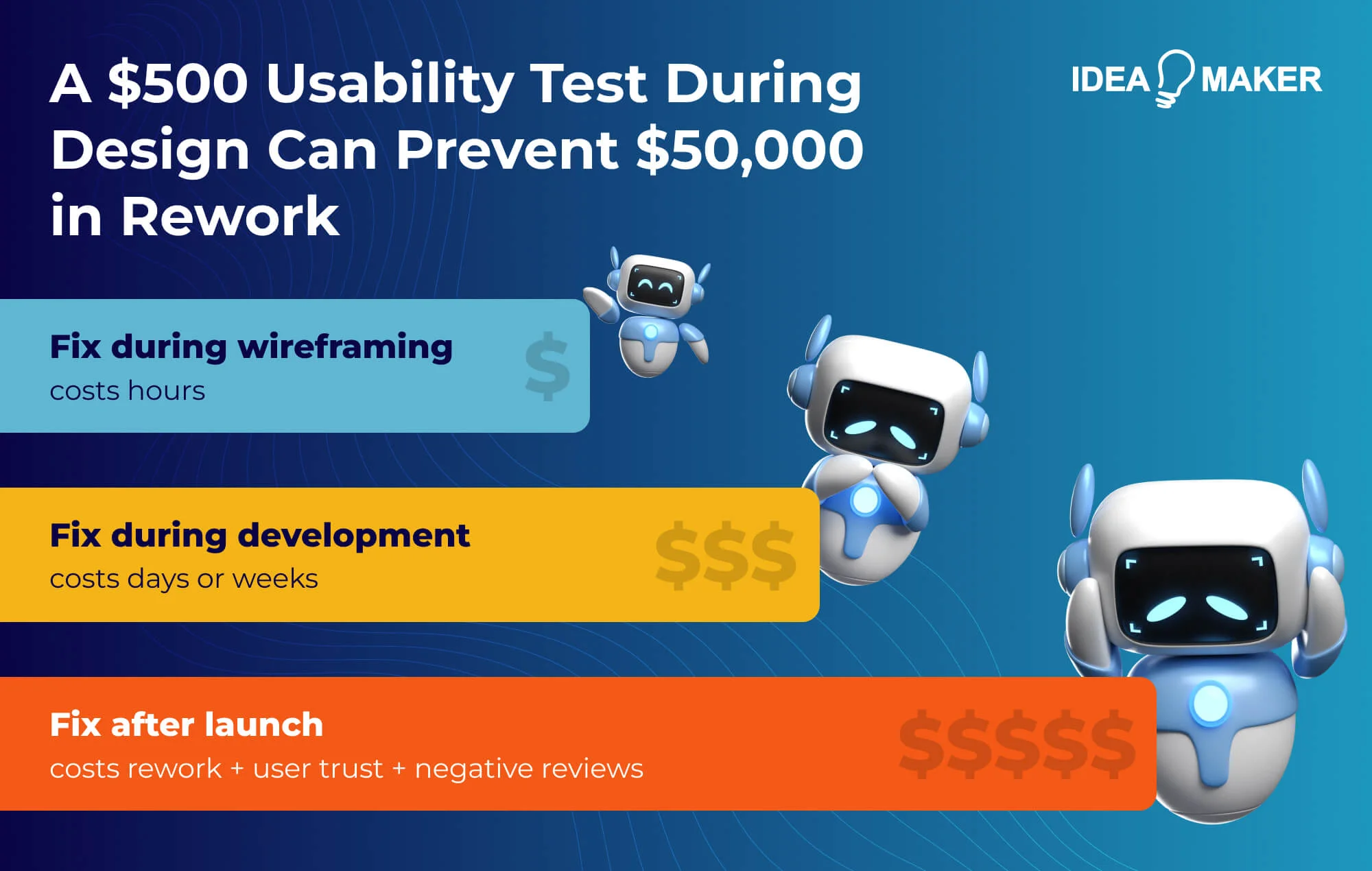
Changes during design cost hours. The same changes during development cost days or weeks. Changes after launch cost even more, plus user trust. A $500 usability test during design can prevent $50,000 in rework.
Teams that skip design validation routinely discover usability issues during QA or from user reviews, when fixes cost significantly more.
Designing for Localization and Global Users
If your app targets international markets, localization planning should start during design. Some languages require 30-40% more space than English.
Colors carry different meanings across cultures, and gestures that are intuitive in one market may be unfamiliar in another. Right-to-left languages like Arabic and Hebrew require mirrored layouts.
Tools & Frameworks Used in UX Research and UI Design
Design tooling influences collaboration quality and feedback speed. UI/UX design and prototyping happen in Figma, Sketch, or Adobe XD. User testing uses UsabilityHub and Maze. Design handoff relies on Zeplin and Figma Dev Mode.
Stage 4 - Frontend and Backend Development
The majority of planning is finally behind you. Development is the stage that typically takes 40-55% of the project budget.
Frontend (Client-Side) Development
Frontend development converts designs into functional screens, handles user input, manages local state, and ensures smooth animations. Native iOS with Swift delivers best performance and full API access.
Native Android with Kotlin provides equivalent capabilities for that platform. Flutter offers strong cross-platform performance, and React Native works well for teams with JavaScript experience. Mobile users expect immediate feedback, so animations should run at 60fps and network requests shouldn't block the UI.
Backend (Server-Side) Development
Most applications require server-side components for user management, data persistence, and integrations. REST APIs remain common, but GraphQL offers flexibility for complex data requirements.
Authentication options range from custom systems to services like Firebase Authentication or Auth0. AWS, Google Cloud, and Azure provide services that scale with demand. Design for horizontal scaling from the start, and build in security fundamentals including encryption, input validation, and proper authorization.
Agile Development in Practice
Work breaks into time-boxed sprints, usually two weeks. Sprint planning selects work from the prioritized backlog, and demos at sprint end keep stakeholders aligned. Adding features or changes affects both timeline and budget, so good teams have a process for evaluating requests before committing.
Moving fast only helps if the code actually works, so skipping code review, testing, or documentation usually slows you down later.
Tools & Frameworks Used in Development
IDEs include Xcode, Android Studio, and VS Code. Version control uses Git with GitHub or GitLab. CI/CD and automation rely on GitHub Actions, Bitrise, or Jenkins.
Stage 5 - Quality Assurance and Testing
Mobile apps face specific testing challenges: varied device setups, unpredictable network conditions, battery and memory limits, and high user expectations. In 2024, Apple reviewed over 7.7 million submissions and rejected approximately 1.93 million, with performance issues as the leading cause.
Functional testing verifies features work as specified. Usability testing observes real users completing tasks. Performance testing measures launch time, animation smoothness, and battery impact. Security testing identifies vulnerabilities using frameworks like OWASP Mobile Security Testing Guide.
Manual testing catches issues requiring human judgment. Automated testing handles repetitive verification through unit tests, integration tests, and UI tests. Most teams use both. Cloud services like BrowserStack and Firebase Test Lab let you test on real devices without maintaining a device lab.
Why Skipping QA Is One of the Most Expensive Mistakes
A bug found during development costs hours to fix. The same bug found in production can cost days, plus user trust, support overhead, and potential revenue loss. Users who encounter bugs leave negative reviews, low ratings suppress discoverability, and suppressed discoverability reduces downloads.
Tools & Frameworks Used in QA and Testing
QA relies on both automated and manual tools to catch functional, performance, and security issues across devices and platforms before they reach users.
- Automated testing: Appium, XCTest, Espresso
- Manual & device testing: BrowserStack, Firebase Test Lab
- Performance & security testing: JMeter, OWASP tools
Stage 6 - Deployment and App Store Release
Release preparation includes final build verification, app store listing assets, privacy policy and terms of service, and analytics integration. Apple's App Store review typically takes 24-48 hours, while Google Play is usually faster.
App Store Optimization affects discoverability through keywords, screenshots, ratings, and localization. Common rejection reasons include performance issues, legal problems, and design violations. Read the guidelines thoroughly before starting design, and test on actual devices rather than just simulators.
Before launching, verify that all features work as expected, create a rollback plan if critical issues emerge, and coordinate backend and mobile releases carefully using feature flags or backward-compatible API changes.
| Checklist Item | Key Points |
| Feature Verification | Ensure all app features work as intended |
| Performance | Test on target devices for smooth operation |
| Metadata & Screenshots | Complete, accurate, and optimized for app store |
| Privacy Policy | Accessible and covers all data practices |
| Support Info | Contact details are up-to-date |
| Analytics & Crash Reporting | Configured and tracking properly |
App Store Rejections and How to Avoid Them
Getting rejected by an app store can delay your launch, so it’s important to understand the common pitfalls and address them before submission.
Common compliance issues include privacy policy problems, data collection declarations that don't match actual behavior, and missing purpose strings for sensitive permissions. Ensure your app's description accurately reflects functionality, request only permissions your app actually needs, and keep privacy policies updated.
Tools & Frameworks Used in Deployment
Deployment tooling affects release speed, approval success, and the ability to recover quickly from failed launches.
Release management uses App Store Connect and Google Play Console. Build and distribution rely on TestFlight and Firebase App Distribution. Versioning uses Git tagging and release pipelines.
How Much Does It Cost to Develop a Mobile App?
Mobile app development doesn’t have a fixed price - it depends on your project’s scope and requirements.
However, these factors influence costs:
| Factor | Impact |
| App complexity | Simple ($20K-60K) vs. complex ($150K-300K+) |
| Platform choice | Single platform vs. both iOS and Android |
| Development approach | Native vs. cross-platform |
| Team location | US ($100-150/hr) vs. Eastern Europe ($40-75/hr) |
| Backend requirements | Simple API vs. complex real-time infrastructure |
Cost distribution typically looks like this: discovery 10-15%, design 20-25%, development 40-55%, testing/deployment 15-20%. Maintenance runs 15-25% of initial cost annually.
To get precise estimates, you can connect to us and request quotes based on your specific project.
How AI Is Changing the App Development Process
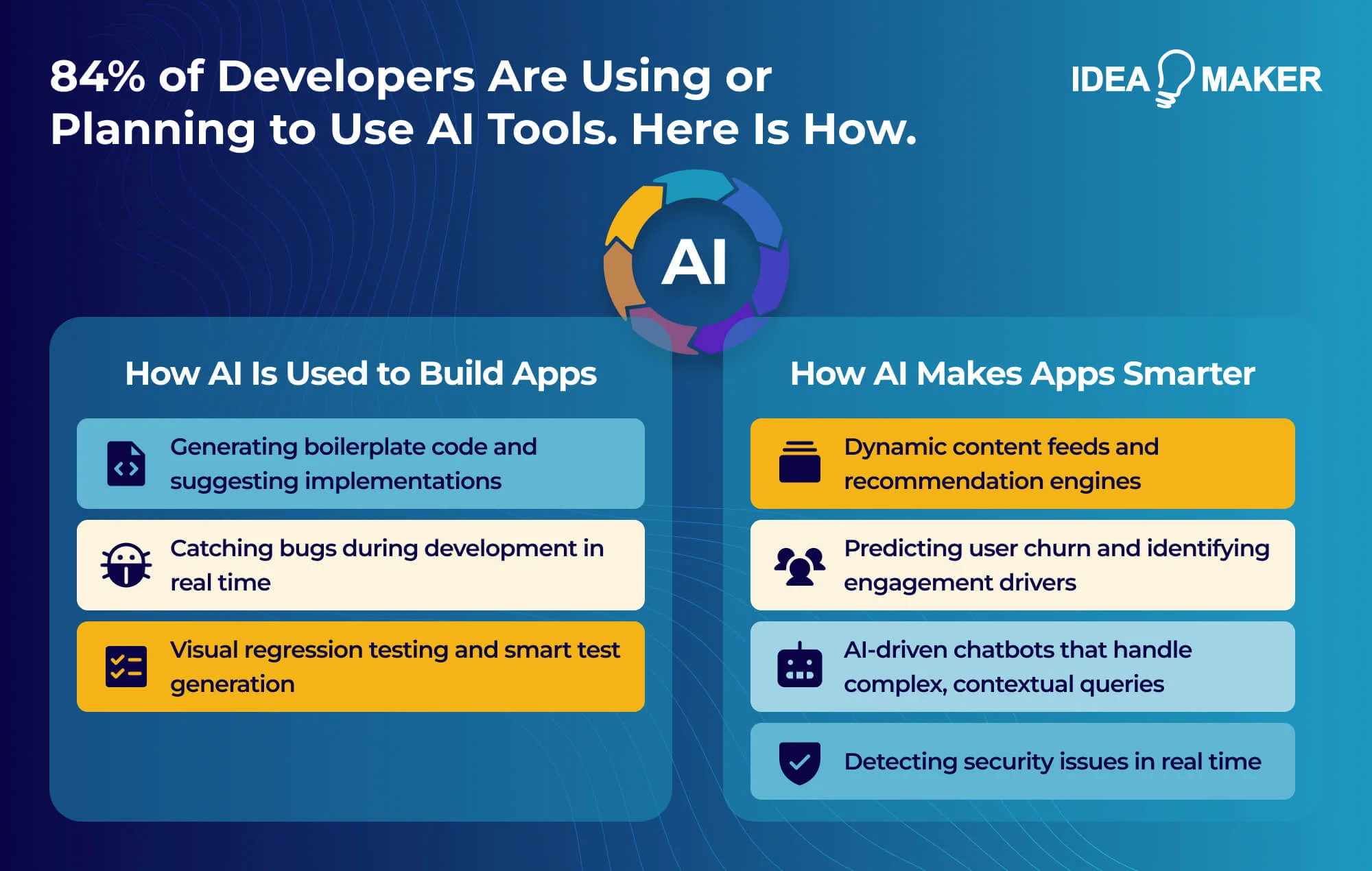
AI is changing how apps are built by automating coding, catching bugs on the fly, and speeding up testing. The 2025 Stack Overflow Developer Survey reports that 84 % of developers are using or planning to use AI tools, with 51 % using them daily. Beyond development, AI helps apps adapt to user behavior, support natural interactions, and detect security issues in real time, making them more responsive and intelligent.
AI-assisted coding through GitHub Copilot, Cursor, and Claude accelerates development by generating boilerplate code and suggesting implementations. While development timelines for specific tasks can shrink by 15% to 30%, the workload often shifts toward reviewing and validating AI-generated code.
Intelligent UX personalization allows apps to adapt to users through dynamic content feeds and recommendation engines. Automated testing has also evolved to include visual regression testing and smart test generation. Predictive analytics now help teams forecast user churn and identify features that drive engagement. Additionally, AI-driven chatbots built on large language models handle complex queries and provide contextual support within the app.
The development consideration: integrating AI assistants requires thinking about prompt engineering, context management, and graceful failure modes - skills that weren't part of traditional mobile development.
What Other Emerging Technologies Can Be Integrated Into Mobile Apps?
Beyond standard features, you can integrate several technologies to expand what your app can actually do.
Generative AI enables image generation, content creation tools, and personalized content at scale.
IoT integration connects apps to smart home devices, wearables, and industrial sensors. AR through ARKit and ARCore enables virtual try-on, navigation overlays, and interactive content.
Blockchain provides verifiable credentials, supply chain transparency, and decentralized data ownership.
5G enables real-time multiplayer gaming and cloud gaming with minimal lag. Wearables let apps extend to Apple Watch, Wear OS, and fitness trackers.
Common Pitfalls in the Mobile App Development Process
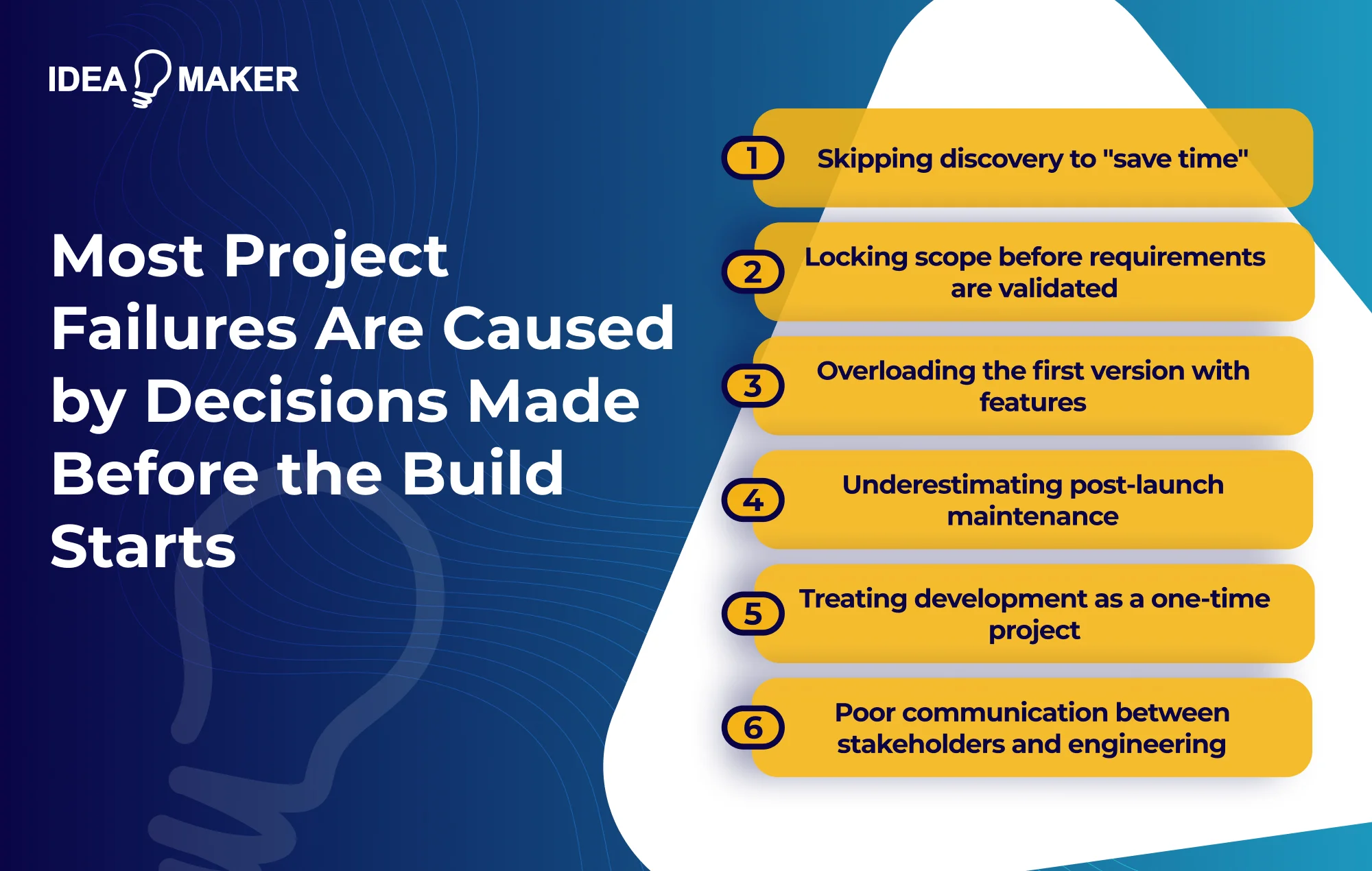
Most project failures are caused by specific execution errors that happen well before the build starts.
- Teams frequently skip discovery to "save time," which usually results in building the wrong product very confidently.
- Locking scope too early is another issue, as it enshrines initial assumptions rather than allowing the team to adapt to validated requirements.
- Many also underestimate post-launch work, leaving them scrambling when maintenance and updates inevitably require more resources.
- Treating development as a one-time project rather than a continuous investment causes apps to stagnate and lose users to competitors.
Other common mistakes include skipping research and validation, which leads to a product nobody needs, and overloading the first version with features, which complicates the user experience and delays the launch.
You should also watch out for ignoring UI/UX best practices, underestimating the time needed for testing, and maintaining poor communication between stakeholders and the engineering team.
Best Practices for a Successful Mobile App Dev Process
Following a structured process helps, but applying these specific engineering and product practices will keep your project on track.
Start with an MVP mindset by building the smallest version of your product that tests your core hypothesis.
Prioritize user experience over features, since a few features that work beautifully beat many features that work adequately.
Invest in scalable architecture early to avoid painful infrastructure rebuilds once you are under heavy load.
Use data-driven decision making by instrumenting your app with analytics from the start.
Finally, choose the right development partner by evaluating their relevant experience, process maturity, and communication patterns.
How Idea Maker Supports Mobile App Projects
Idea Maker partners with startups and enterprises across the complete mobile app development lifecycle, from early-stage concept validation through long-term product evolution.
What we bring to the table:
| Capability | What This Means |
| Product Strategy | MVP scoping, roadmaps, technical requirements |
| UX/UI Design | Research-driven design, prototype validation |
| iOS & Android Development | Native and cross-platform (Swift, Kotlin, Flutter, React Native) |
| Backend & Infrastructure | Scalable architectures on AWS, Google Cloud, Azure |
| Quality Assurance | Device testing, performance optimization, compliance checks |
| Post-Launch Support | Maintenance, monitoring, feature iteration |
The team provides product strategy, including MVP scoping, roadmaps, and technical requirements. UX/UI design is delivered through research-driven design and prototype validation. Development covers both native and cross-platform builds using Swift, Kotlin, Flutter, and React Native.
Backend and infrastructure work involves building scalable architectures on AWS, Google Cloud, and Azure. Quality assurance includes device testing, performance optimization, and compliance checks. Post-launch support covers maintenance, monitoring, and feature iteration.
If you’re considering a mobile app project and want to discuss next steps, don’t hesitate to reach out.
Frequently Asked Questions
How long does mobile app development usually take?
Timelines depend on complexity and how well requirements are defined upfront. Simple applications typically take 2-4 months from kickoff to app store submission. Medium complexity apps with integrations and custom backend work run 4-7 months. Complex applications with real-time features or compliance requirements can take 6-12 months or longer. These estimates assume experienced teams without major requirement changes - uncertainty and scope evolution extend timelines proportionally.
What phase costs the most and why?
Development consumes 40-55% of most project budgets because it involves the largest team working for the longest duration. However, discovery and design have disproportionate impact on total cost because decisions made there constrain everything that follows. A poorly defined requirement can cascade into weeks of rework, and skipping design validation often means discovering usability problems during QA - where fixes cost significantly more.
Can stages overlap in Agile development?
Yes, and mature teams deliberately plan for parallel work streams. Design continues on upcoming features while engineering implements current scope. Testing runs throughout via continuous integration rather than waiting until the end. The key is managing dependencies between tracks so teams aren't blocked waiting for handoffs.
How much of the process happens after launch?
For successful apps, the majority of lifetime effort often occurs post-launch. Maintenance typically requires 15-25% of initial development cost annually - covering OS updates, security patches, and bug fixes. Feature development continues as long as the app competes in market. Teams that budget only for initial development are consistently surprised by post-launch resource requirements.
What inputs are required from clients at each stage?
Discovery requires domain expertise and access to potential users. Design requires feedback on direction and decisions about tradeoffs. Development requires timely responses to scope questions. Testing requires acceptance criteria and sign-off. Throughout the process, the most important input is honest feedback about whether what's being built aligns with actual business needs.
Your Next Move
Mobile app development is a continuous lifecycle, not a project with a defined endpoint. Development requires an ongoing investment - it doesn't end just because the code shipped to production.
Process discipline is what actually keeps a build on track. You need clear requirements, validated designs, thorough testing, and a system for acting on user feedback.
The most important decision isn't which framework to use; it's having absolute clarity on the problem being solved and who it's being solved for. Everything else builds off that foundation.