Benefits of Flutter App Development in 2026
Building a mobile app used to mean choosing between two separate development teams: one for iOS, one for Android. Flutter changed that. Released by Google, it gave developers a single codebase that could produce high-quality, native-feeling apps for both platforms, cutting costs and development time without sacrificing performance.
Early cross-platform frameworks struggled to match the performance and feel of native apps a gap that made many development teams default to building separate iOS and Android codebases. Flutter and React Native changed the calculus by delivering near-native performance through a single codebase, making cross-platform development a genuinely viable option for the first time
What is Flutter App Development
Google showcased what would later become Flutter in 2015 at the Dart Developer Summit. A couple of years later, in 2017, it was released during the Google I/O event, and since then, it has soared in popularity.
While still new in the market, Flutter has already been adopted by giants like BMW, Tencent, and eBay. Flutter is mainly about the Dart programming language, which has many C/C++ and Java influences, making learning it easier.
While Flutter may have been released later than established giants like React Native, the community has grown into one of the most active in open source, with over 175,000 stars on GitHub and consistent contributions across every release cycle.
What Makes Flutter App Development Stand Out
While Flutter may still be young, it has a bright future ahead. One of Flutter's most developer-friendly features is Hot Reload. Traditionally, testing a UI change in mobile development meant stopping the app, rebuilding it, and navigating back to the screen you were working on — a process that could eat several minutes per iteration. Hot Reload eliminates that cycle entirely. Changes reflect on the device or emulator in under a second, without losing the app's current state. For teams iterating quickly on UI or tracking down a visual bug, this alone can cut hours off a development session
Flutter also has many widgets ready to use. These widgets are the building blocks used to define the appearance of UI elements like shadows, buttons, text, and the height of columns. And having so many of them available makes development faster, smoother, and more accessible.
The Flutter community is incredibly active, and their efforts have improved Flutter's performance by refining how it directly communicates with native modules, leading to short response times and ensuring even data-intensive apps have the superior performance of Flutter.
Benefits of Flutter App Development
Flutter is a complete tool with low cost, smooth UI, outstanding performance, accessibility options, portability, and is heavily customizable. On top of that, there's excellent documentation and support from Google and the community built around it. So let's outline some of the main benefits of developing your cross-platform application with Flutter.
Fast Assembly with Widgets
At the core of Flutter's development experience is its widget system. In most frameworks, UI is built using a mix of platform-specific views, layouts, and components that behave differently across operating systems. Flutter takes a different approach: everything is a widget.
Buttons, padding, fonts, alignment, animations all of it is expressed as a widget, giving developers a single consistent model to work with regardless of the target platform. This uniformity makes the codebase easier to read, maintain, and scale. Flutter ships with an extensive library of pre-built widgets that match both Material Design and Apple's Cupertino style guidelines out of the box.
And when the built-in options don't cover a specific need, custom widgets can be built and reused just as easily
Flutter Web & Desktop
Flutter takes the cross-platform approach even further by being compatible with Desktop, Windows, macOS, and Linux. Furthermore, all this is done without any changes to your Dart source code. Flutter's desktop support has since reached stable release, meaning teams can now confidently ship production-ready applications across mobile, web, and desktop from a single codebase
Lower Production Cost
Developing with Flutter requires only one developer team instead of two, making projects cheaper. That way, the resources are optimized on a single project and share one codebase, which leads to improved and advanced applications with faster development.
BMW's My BMW app, for example, was built with Flutter giving the team a single codebase that works across both iOS and Android without maintaining separate development tracks.
Amazing Performance
Flutter mobile applications deliver performance that holds up closely against native applications. Because Dart compiles directly to native ARM code and Flutter renders using its own engine rather than relying on platform UI components, it sidesteps the performance bottlenecks common in bridge-based frameworks. Independent benchmarks have shown that Flutter consistently maintains high frame rates with minimal dropped frames, even on graphically demanding interfaces.
It accomplishes this by eliminating the middleman, such as JavaScript bridges, significantly improving the communication between the application and the platform.
Also, they use their own widgets instead of an original equipment manufacturer (OEM). That way, no resources are wasted communicating, as Dart compiles directly into native code. And they offer tools and methods to measure its performance, troubleshoot issues, and improve to ensure you achieve the target frame rate.
Stunning UI
Flutter makes mobile applications look smooth, sharp, and pleasing to the eye. They're constantly improving upon its visuals, providing free, ready-to-use interface components that make your application look slick and professional, with no additional costs.
Google Pay and eBay Motors are among the high-profile apps built with Flutter, both of which demand polished, high-performance interfaces that hold up against user expectations set by native apps
Rendering Engine
Flutter's rendering is powered by its own graphics engine — originally built on Skia and now transitioning to Impeller, Google's newer rendering backend designed specifically for Flutter. Unlike frameworks that rely on each platform's native UI components to render the interface, Flutter draws every pixel itself. This means the app looks and behaves identically across platforms without requiring per-platform UI adjustments. It also gives Flutter precise control over animations and transitions, which is why Flutter interfaces tend to feel exceptionally smooth even on mid-range hardware.
Improved Accessibility
Accessibility is essential to reach as many users as possible, and Flutter comes with accessibility tools by default. For instance, larger and adjustable fonts, screen reading with auditory feedback about Flutter UI elements, contrast options, and more.
These features aren't add-ons that require third-party libraries; they're built into the framework by default, meaning accessibility is part of the product from day one rather than an afterthought
Internationalization Made Easy
Mobile applications are often released in several countries and multiple languages, which can get expensive. Flutter makes this process painless and cheap by providing widgets and classes to aid developers in changing text, layouts, and values without having to code everything by hand. In addition, flutter libraries are internationalized by default to help this process even further.
Flutter Community
Flutter is growing rapidly. This growth can easily be observed when looking at GitHub numbers. These numbers reflect community activity and Google search, with a constant uptrend in interest.
But the Flutter community isn't only on GitHub. You can find many developers asking questions and getting helpful answers in communities like Stack Overflow, Reddit, Medium, and many others. And while still young, Flutter makes for a respectable alternative to the more mature React Native due to its simplicity and modularity.
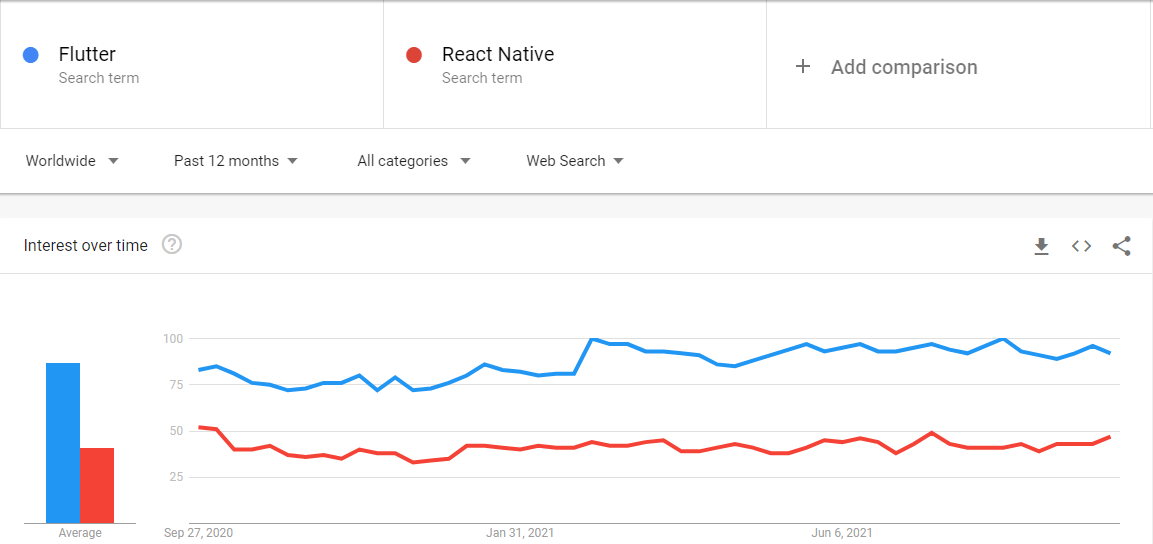
The popularity of mobile frameworks in the last 12-months. Source: Google Trends.
Well-Documented
Google does a fantastic job when it comes to building comprehensive, complete, and well-organized documentation. You can get organized documentation and video tutorials from Google and plenty of examples to help you get started with Flutter. And if you want to dive even deeper, places like Udemy, Coursera, and Pluralsight offer great courses.
Google constantly updates and revises this documentation. Also, new videos are often added to their developer playlist, where you can learn from established professionals with years of experience!
Guaranteed Support
Working with a Google product has its benefits, like experiencing the entirety of Google's ecosystem, which comes in handy when developing your app. In addition, Google keeps investing massively in Flutter, so you won't have to worry about a lack of support in the years to come.
The best sign of Flutter's longevity is how Google uses it everywhere in its products, meaning that Flutter is constantly under heavy scrutiny. These constant updates lead to more bug fixes and improvements happening a lot faster, making it a stable and reliable tool.
And Flutter is part of a project Google has been working on for years now called Google Fuchsia. It's used to improve performance, make the project multiplatform, and build the UI. So we can be confident it will receive support for the following years.
What are Other Types of App Development
Understanding what makes Flutter compelling requires some context around the broader landscape of mobile development. Teams evaluating Flutter are almost always choosing between it, native development, or another cross-platform framework — so it's worth understanding what each option actually involves.
Companies and teams often face the same dilemma when developing mobile apps: Should my app be native or cross-platform? And the truth is, there's no correct answer here. Both options have their benefits and setbacks, and the choice will vary depending on the project's needs. So let's explore those differences and how they affect both the app and the development process.
Native App Development

Native mobile developers create applications for specific mobile operating systems. Each system requires developers to learn particular programming languages. For example, we use Swift or Objective-C for iOS development. However, for Android, Java or Kotlin are used.
Native apps have several advantages. By default, they use both device and operating system features such as GPS, camera, contact list, etc. When developers work with native apps, they know what they are dealing with, so optimizing memory, building intuitive UIs, and knowing how users interact with UI elements are key advantages.
All this knowledge will often translate into apps that feel considerably more intuitive and smoother to users. However, native development requires a separate codebase for iOS and Android, which adds to development time and is significantly more expensive.
iOS Native Development
Swift is the go-to language when coding for iOS. It has simple syntaxes, better performance, and is stable. It focuses on iOS and OS X to make native apps safer, increase flexibility, and make building apps more accessible. Additionally, SwiftUI makes building interfaces a straightforward process. This is the future of iOS development and where most new developers should invest their time.
Android Native Development
When using native languages such as Java or Kotlin, you can expect massive support from Google and seamless integration with faster and more efficient apps. Android development can also be done in C or C++ using the Android Native Development Kit (NDK), even though Google doesn't encourage it.
When using C/ C++ languages, you won't use a Java virtual machine to run your code. Instead, it will natively run on the device. Using NDK to write apps using C/C++ is a must when looking to squeeze every ounce of performance from devices, making it ideal when developing apps like modern mobile games.
Cross-Platform App Development

React Native App Development
React Native was publicly released in 2015 and was adopted by some big companies like to develop apps like Instagram, Facebook, and Uber. React Native uses JavaScript, React JS, Python, C++, and C. Its diversity ensures that more developers will know how to work with it, leading to greater performance and cleaner codes.
React Native has a large community active on GitHub with over 93k stars, 23k commits, and 2k contributors. The community is constantly iterating on the project, answering questions, and contributing to its improvements.
Final Words - Benefits of Flutter App Development

Flutter has matured from a promising experiment into a production-grade framework trusted by some of the world's most recognizable companies. For teams weighing their options, the case for Flutter comes down to a straightforward value proposition: one codebase, one development team, and one consistent user experience across every platform you need to reach. The cost savings are real, the performance holds up, and Google's continued investment means the framework will keep pace with wherever mobile development goes next. For most businesses building a new app today, Flutter is worth serious consideration
Contact us at Idea Maker, and we'll help you build an app that meets your goals, reaches your audience, and makes the most of your development budget
Frequently Asked Questions About Flutter App Development
Is Flutter still relevant in 2026?
Yes. Flutter is currently the most popular cross-platform mobile framework, with around 46% of software developers using it to build apps. Google continues to invest heavily in it, with stable releases shipping on a predictable quarterly schedule and the framework expanding into web, desktop, and embedded devices.
What programming language does Flutter use?
Flutter uses Dart, a language developed by Google. It supports both just-in-time (JIT) compilation during development which powers features like Hot Reload — and ahead-of-time (AOT) compilation for release builds, which is what gives Flutter apps their native-level performance.
Can Flutter apps be submitted to the Apple App Store?
Yes. Apple's App Store contains many apps built with Flutter, and Apple has frequently featured well-designed Flutter apps. Apps built with Flutter should follow Apple's standard guidelines for App Store submission.
How long does it take to build a Flutter app?
It depends on the app's complexity, features, and integrations. A simple Flutter MVP can take 6–10 weeks, a mid-complexity app 3–5 months, and a large, feature-rich product 6 months or more.
Is Flutter good for enterprise and large-scale apps?
Yes. For engineering managers and businesses, Flutter allows the unification of app developers into a single mobile, web, and desktop team, building branded apps for multiple platforms out of a single codebase speeding up feature development and synchronizing release schedules across the entire customer base.
What kinds of apps is Flutter best suited for?
Apps that need to deliver highly branded designs are particularly well suited for Flutter. It also excels in apps that require smooth animations, consistent cross-platform UI, and high performance making it a strong choice for fintech, e-commerce, and consumer-facing products where visual quality and speed both matter.